Settings transfer
What this is for
Read the numbered elements, choose the values you need, then use the window’s command to continue.
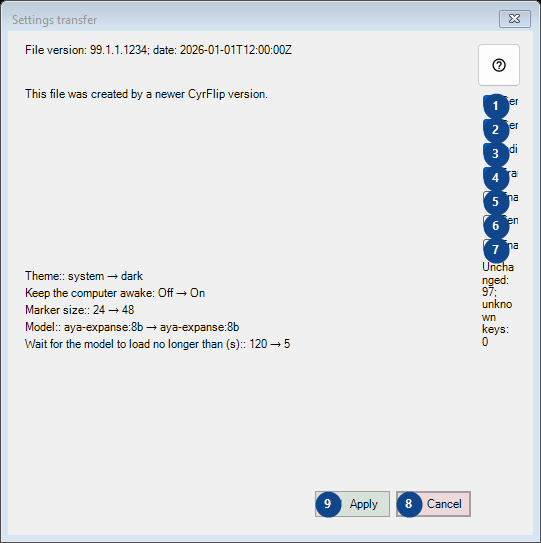
In this order
Read the numbered elements, choose the values you need, then use the window’s command to continue.
The elements
1. General - Language and theme
Use this command when you need the action named above. Review any confirmation before accepting it.
Your shortcuts2. General - Power and screen
Use this command when you need the action named above. Review any confirmation before accepting it.
Your shortcuts3. Indicators
Use this command when you need the action named above. Review any confirmation before accepting it.
Your shortcuts4. Translation - Ollama
Use this command when you need the action named above. Review any confirmation before accepting it.
Your shortcuts5. Enable clipboard history
Use this command when you need the action named above. Review any confirmation before accepting it.
Your shortcuts6. Send selections to another server
Use this command when you need the action named above. Review any confirmation before accepting it.
Your shortcuts7. Enable the quick notes
Use this command when you need the action named above. Review any confirmation before accepting it.
Your shortcuts8. Cancel
Use this command when you need the action named above. Review any confirmation before accepting it.
Your shortcuts9. Apply
Use this command when you need the action named above. Review any confirmation before accepting it.
Your shortcuts