Dialog help
Google Translate - cost
Before anything is sent to Google, the converter says how many characters it would send and what Google would charge, and waits for your answer.
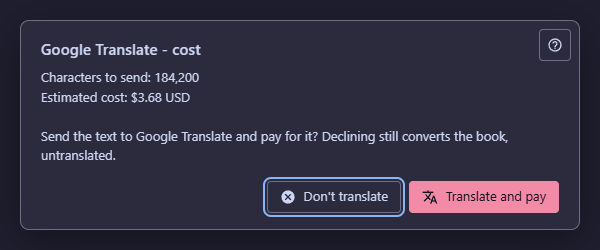
In this order
- Read the estimate 2: how many characters would go to Google and what that costs.
- If you do not want to pay, answer Don't translate 4. It is the answer with the focus, so Enter and Esc choose it, and the book is still converted - without a translation.
- If you accept, answer Translate and pay 3. The text is sent and Google charges your account.
The elements
1Help (F1)Opens this page without closing the question.
The question stays open and waits while you read. F1 does the same.
2The estimateHow many characters would be sent and what Google would charge for them.
The converter counts the characters of the pages, the title and the table of contents - characters, not bytes - and multiplies by Google's list price. The question is asked before any request is made, and only for a text longer than 1,000 characters.
- Why
- Google bills by the character, so you see the price before you commit.
- Next
- With a maximum cost set under Advanced, an estimate within it is accepted without asking; an estimate above it skips the translation and converts the book without one.
3Translate and paySends the text to Google and pays for the translation.
The pages are translated by Google Cloud Translation with your own key while the book is built, and the book is saved already translated.
- Why
- Choose it when you want the translation saved inside the book instead of using Chrome's free page translation.
- Undo
- What Google has charged cannot be taken back. Cancel stops the rest, and the pages already sent are paid for.
4Don't translateConverts the book without translating it. Nothing is sent.
The book is converted exactly as with the free engine; you can still translate it in Chrome afterwards. Closing the question or pressing Esc is the same answer.
- Why
- It is the safe answer, so it has the focus.
- Undo
- Nothing was spent. Convert again and answer differently if you change your mind.
- Shortcut
- Enter or Esc.