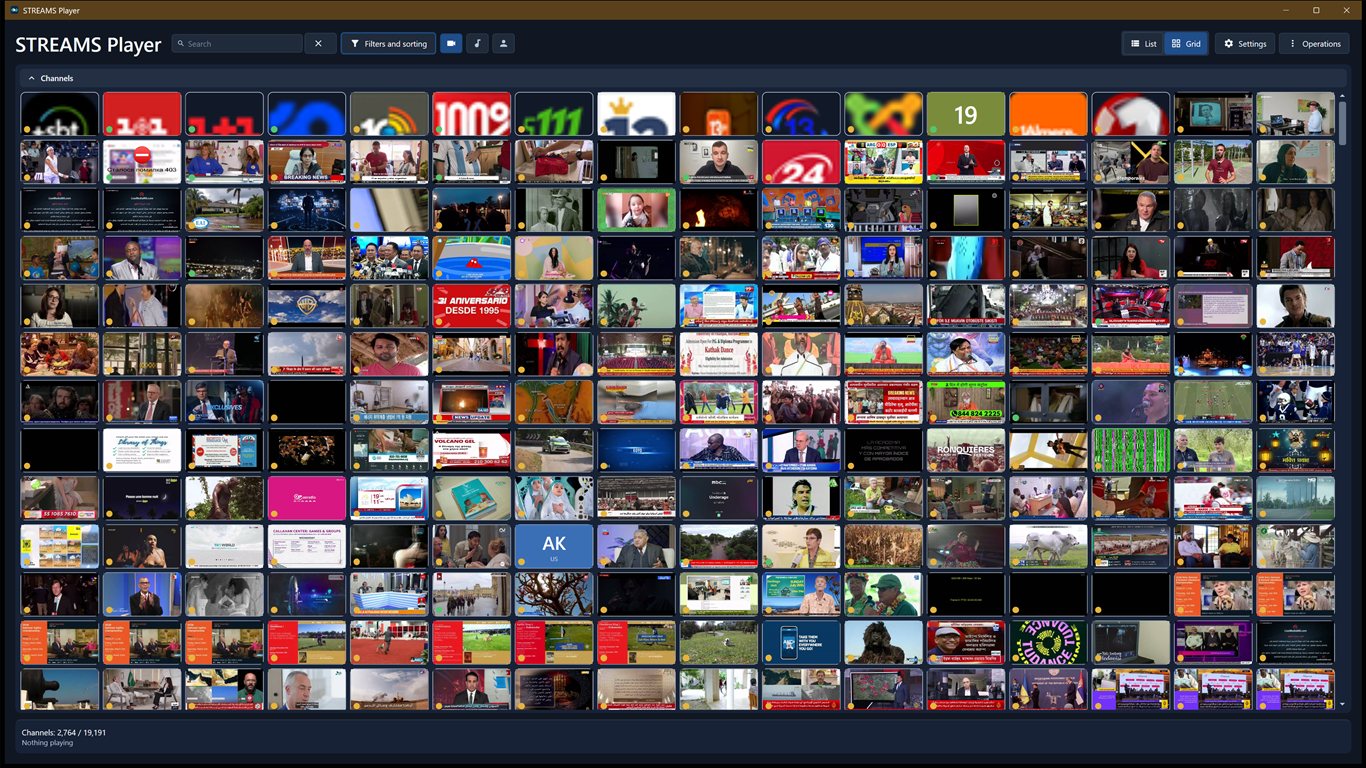
A focused Windows desktop app: browse a curated catalog, add your own streams, and play them - no account required, no ads, nothing running in the background you did not ask for.
Windows 10 / 11Free · MIT sourceNo account requiredNo telemetry13 interface languages
STREAMS Player is an independent Windows desktop app for internet radio, live video, and RTSP network cameras. It reads a curated, public stream catalog so you get a working list of channels on first run - then lets you search, sort, pin, and add your own, all stored locally on your machine.
The point is calm: a player that stays a player. The catalog refreshes only when you ask, your manually added and imported streams are never overwritten by an update, and no account is required and there is no advertising, analytics, or author-run service. What runs on your PC is what you started.
#What it can do
Everything needed to find, keep, and play a stream - grouped by what you are actually doing.
01Find a channel
A curated catalog, plus a built-in copy of it you can apply on first launch with no network. A channel the catalog gave no icon still gets a face of its own - initials and a colour taken from its name, plus its country code where known.
Filter by category, topic, language, country, media type - open the row when you need it.
Search always sits on the title line.
Pin the channels you return to.
Play a random radio station from the whole catalog - one that stays silent is replaced by the next draw.
02Play the right way
Radio plays in the main window and names the track on air whenever the station provides it.
Stop the sound without losing the station - the volume you set and the sleep timer stay, ready to resume.
Live video and RTSP open in a focused player window that shows the track on air over the picture.
A ~15-second live buffer, and video that settles at the quality your connection holds, then opens there next time.
Record the live video or radio you are playing straight to a file, without interrupting playback: video goes to the Recordings folder in Videos, radio to the Recordings folder in Music, or to folders you choose.
Listen to a live audio or video broadcast from a FastMediaSorter phone or watch - over your local network, or through your exchange server's relay when the broadcast offers one.
03Watch your way
Keep the main window or player always on top, or go borderless full screen with F11 (Esc exits).
The player is a window of its own - minimize the catalog and the picture keeps playing. Pin its control panel to keep it on screen.
Very Small to Large stream tiles, a light, dark or Windows-matching theme, and a Settings window with search and collapsible groups that reopens where you left it.
Save the frame you are watching as a JPEG.
The player says why over the video whenever the picture stops - and re-opens a stream that froze silently.
Shrink the catalog to a small captionless panel while radio plays - the station and track on top, and below them the volume, the sleep timer, previous and next station, a random station, Record, and the panel's own always-on-top, back and minimize buttons.
04Visual grid
A grid that captures visible HTTP(S) video previews.
Caches preview frames on disk, up to 150 MB.
Automatic preview updates can be turned off.
05Make it yours
Add a stream by URL, no account required.
Your added and imported streams survive catalog updates. A catalog channel you pinned or played is kept, not deleted, when the catalog stops listing it.
Keep local OK / fail playback marks.
Switch the whole interface between 13 languages; the choice is restored.
Group channels into named collections of your own and browse one at a time.
A private Recently played history of your last 100 channels, with the track that was on air - kept on your PC and cleared when you ask.
Import channels from an M3U file or playlist URL, with a preview before anything is added, and export your own or pinned channels to M3U.
06Local by design
Catalog state, manual entries, and pins stay on your device.
Stored under %LOCALAPPDATA%\StreamsPlayer.
Refresh the catalog only when you choose.
#How to use it
Open it and pick a channel - that is the whole flow. Install it with the setup executable, from the Microsoft Store, with winget, or unpack the portable ZIP - or run it from source; you can also launch a stream directly from the command line.
Run it from source
With the .NET 10 SDK installed, restore, build, and launch from the repository root.
./build.ps1 -Run
Pick and play
Browse the catalog, filter or search, then select a channel. Radio starts in the main window; video and RTSP open in the player window. An ordinary launch starts nothing; turn on Resume playback on startup in Settings and it brings back whatever was playing when you last closed the app.
Open a saved channel's three-dot menu and use Copy launch command or Create desktop shortcut. Both use the channel's stored id.
StreamsPlayer.exe --id "channel-guid"
Report a problem with the logs
Open Settings from the gear button in the header, or from the Library settings entry of the Operations menu, and press Send logs to the author on the About page. The app packs the diagnostic logs of the last ten launches with a short summary of your version, Windows and settings into the folder chosen in the Frames folder setting on the Files page of Settings (Downloads if none is chosen), then opens your mail program with the message ready. The confirmation shows the complete path and can open that folder when you ask; you attach the archive and press Send.
All channels are available. Run the installer from the latest GitHub Release, get it from the Microsoft Store, download the portable ZIP, or install with winget install SerZhyAle.StreamsPlayer.
The installer is the file ending in -windows-x64-setup.exe. It installs for the current user alone and never asks for administrator rights, and uninstalling it leaves your channels, pins and history untouched. It is not signed, so Windows warns the first time you run it; every release publishes a .sha256 file beside each download, so you can check that what you got is what was published.