When the Connection Is Weak - Buffering, Reconnecting and Picture Quality
A weak connection does not have to spoil a live stream: FastMediaSorter buffers, reconnects, catches up with live TV and adjusts the picture quality on its own, and tells you plainly when it is your connection and when it is the channel.
Why You'll Love This
A train goes into a tunnel, the Wi-Fi at the cottage comes and goes, the hotel network is slow in the evening. A live stream feels all of it, because it arrives piece by piece while you watch or listen.
Most of the time you do not have to do anything: FastMediaSorter keeps a small supply of the stream in reserve, reconnects quietly, and chooses a picture quality your connection can carry. This recipe explains what you see on screen while that happens, which switch makes radio more patient, and how to tell a weak connection from a channel that has really gone.
- FastMediaSorter in the Standard, noLegal, Legacy or VR edition with Streams turned on.
- A channel you want to play. Everything on this page happens by itself; only step 2 has a switch.
Read the caption under the spinner
While a stream is loading, a spinner turns in the middle of the screen, and a short caption under it tells you which kind of wait it is:
- Buffering.. - the connection works; the app is filling its reserve so the playback does not stutter.
- Reconnecting.. - the connection dropped; the app is building it again.
So a spinner is never a silent mystery: Buffering.. usually ends in a few seconds, Reconnecting.. means it is worth checking the Wi-Fi or mobile data.
Full-screen player on a video channel during loading, spinner with the Buffering.. caption.
Make radio more patient on a shaky line
The player measures how fast your connection really is and sizes its reserve to it: on a weak or unsteady line it keeps a deeper supply, so a short dip passes unnoticed, and on a good line it stays small so the channel starts quickly.
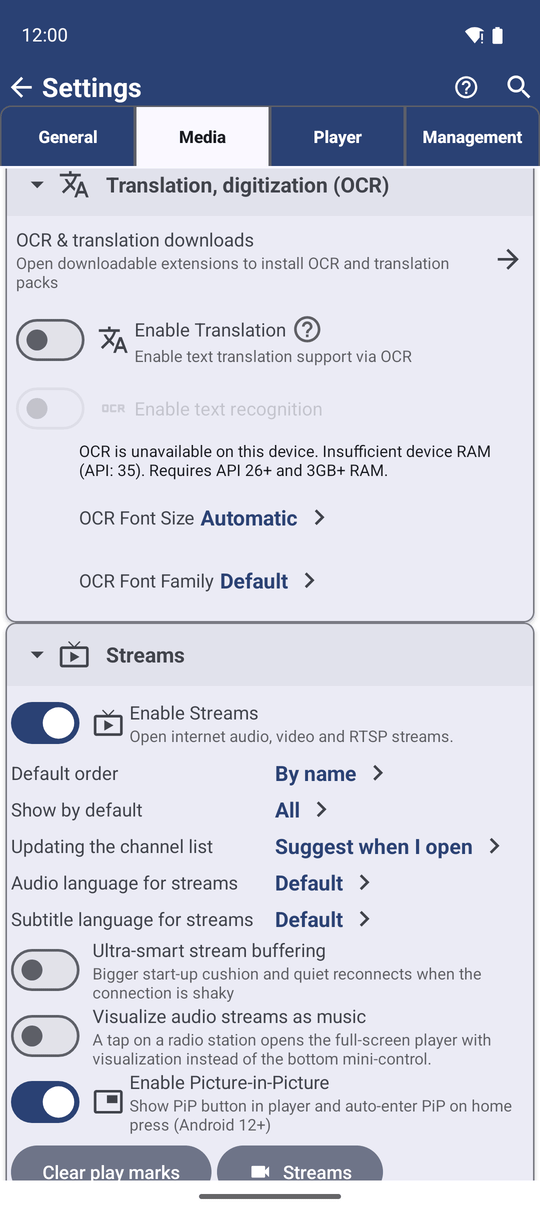
For radio you can ask for even more patience: Settings, the Media tab, section Streams, switch Ultra-smart stream buffering. The station then waits a few seconds longer before it starts, to fill a bigger reserve, and after a short signal drop it reconnects quietly instead of stopping. Turn it off for plain standard playback.
Live TV that falls behind catches up by itself
A live TV channel keeps only the last few minutes of its broadcast available. If a slow moment leaves the player too far behind, that part has already disappeared from the server. Instead of calling the channel dead, FastMediaSorter jumps back to the current moment of the broadcast and carries on. You may notice a small jump in the picture; there is no dialog and the channel keeps its green mark.
Short network drops and busy servers are treated the same way: the player tries again a few times, waiting a little longer each time, before it gives up. The picture follows the broadcast closely, so a live channel stays live.
Picture quality follows your connection
Many TV channels send the same picture in several qualities. If the picture stops to load again and again within two minutes, the player switches to a lower quality so it plays smoothly. A single pause now and then does not count, so a long evening in front of one channel does not slowly slide down to the lowest quality.
Every few minutes the player also tries the next quality up. It keeps it only if the picture really gets there and plays well for a while; if your line cannot carry it, the player tries again less and less often, up to about once an hour.
The app remembers for each channel the quality it settled on, for about a week. Next time you open that channel, it starts right there instead of stumbling through the same pauses again - even after you update the catalog. Channels with only one quality, and RTSP cameras, are left as they are.
When your phone itself is offline
If the phone has neither Wi-Fi nor mobile data, tapping a channel does not start an endless spinner. You see the message No network. Connect to Wi-Fi or mobile data to play streams. right away.
If the connection drops while a channel plays and does not come back, the dialog No connection appears: the channel stopped because your device is offline. The channel keeps its amber mark, because it was not the channel's fault, and the dialog does not offer to remove it.
When a channel really does not answer
If your connection works but the channel itself does not answer - the address has moved, the server refuses, the format is broken - the player does not wait long. The dialog Stream unavailable asks whether to remove the channel from your list, and the channel gets its red mark.
Removing is up to you. A station that is only down for maintenance may be back tomorrow; if you keep it, tap it again later.
Stream unavailable dialog over the Streams list with the channel name and the remove and cancel buttons.
What You Get
Short drops pass without your help, live TV stays live, the picture quality suits your connection, and when something does go wrong the screen tells you whether it is your connection or the channel.
Tips and Troubleshooting
- A stream that freezes silently recovers by itself. When a live stream stops moving with no error at all, the app shows Reconnecting.., tries up to three times to start it again, and only then offers the dialog that the channel is not available.
- Radio keeps cutting out in the car or on the train? Turn on Ultra-smart stream buffering. The start takes a few seconds longer, and short gaps are bridged.
- A channel is red but plays in a web browser? Some channels play only in certain countries or networks; they are marked in the list. See channel pictures, logos and badges.
- The picture got blurry? The connection was slow for a while. The player tries a better quality again by itself; you do not need to reopen the channel.
- Want to see the actual speed? Open the channel's menu and About this channel while it plays: the section This connection shows the incoming speed, the picture size and the codecs.
- Curious how live TV streams work? The two common formats are HLS and MPEG-DASH; both send the picture in short pieces and in several qualities.